Commercial Security System Maintenance: 10 Warning Signs Your System Needs Attention
Your security cameras are installed. Your access control system is running. The alarm panel isn’t showing any obvious problems.
So everything is working, right?
Not necessarily.
One of the biggest mistakes businesses make with commercial security is assuming that once a system is installed, it will continue operating exactly as intended.
Cameras can stop recording without anyone noticing. Hard drives can fail. Software can become outdated. Door readers can develop intermittent problems. And a system that worked perfectly when it was installed may no longer provide adequate coverage as the property changes.
The worst time to discover one of these problems is after an incident.
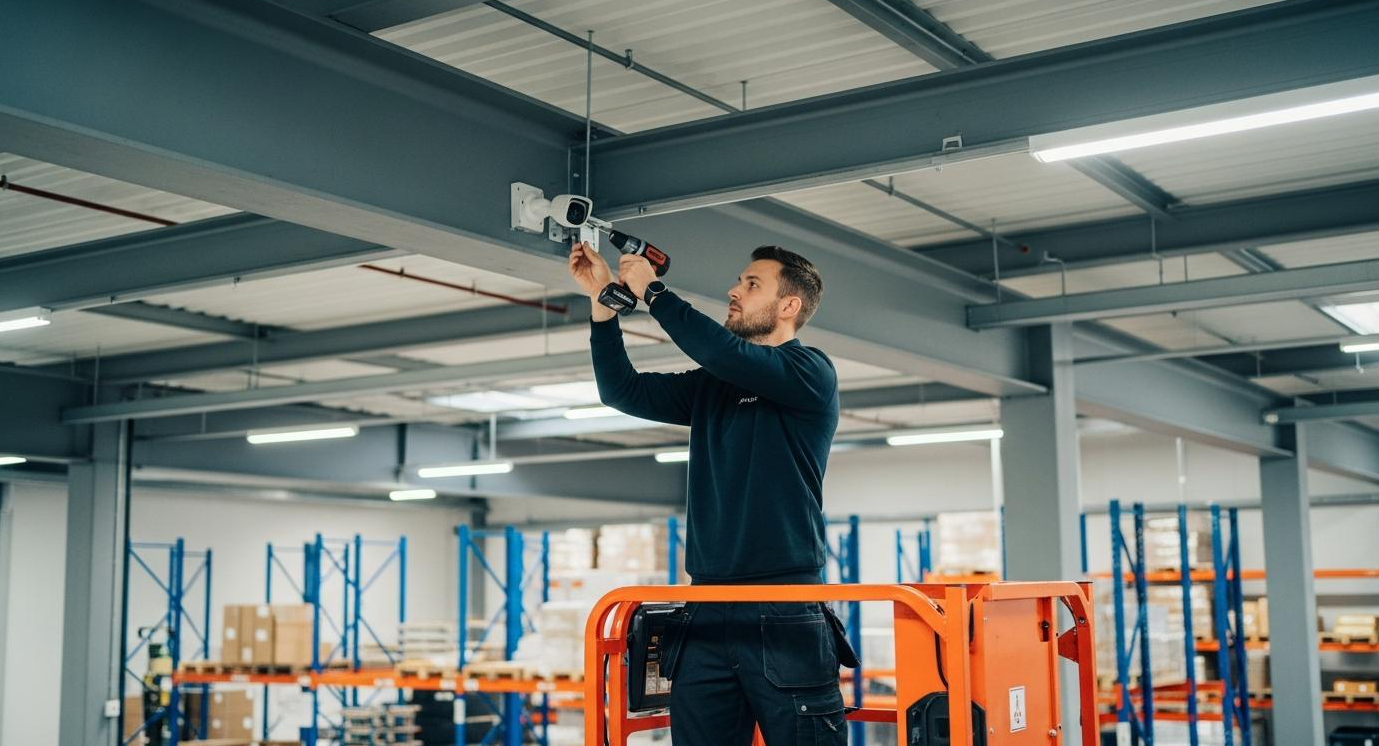
That’s why commercial security system maintenance is so important. Regular inspections, preventive maintenance, and system performance checks help businesses identify problems before they create significant security gaps.
At ESI Fire & Security, we understand that commercial security systems are investments. The goal isn’t simply to install equipment. It’s to make sure that equipment continues to support your business and protect your property.
Here are ten warning signs that your security system may need professional attention.
1. Your Security Cameras Are Online, but Some Aren’t Recording
This is one of the most concerning issues we see with commercial surveillance systems.
A camera may appear in your video management software and display a live image, giving the impression that everything is working.
But when you try to retrieve footage from several days earlier, the recording isn’t there.
There are several possible reasons.
The recording schedule may have changed. Storage may be full or malfunctioning. A camera may have lost communication with the recording server. Software settings may have been modified, or the system may be experiencing intermittent network problems.
Whatever the cause, the result is the same: a business believes an area is being recorded when it isn’t.
What to check: Don’t just look at live camera feeds. Periodically select cameras throughout your facility and verify that recorded footage is available for the expected retention period.
If you discover missing footage, a professional inspection can help determine whether the problem involves storage, network connectivity, camera configuration, or the video management system.
2. Camera Image Quality Has Declined
Security camera image quality doesn’t always fail all at once.
Sometimes the decline is gradual.
A camera that once provided a clear view of your loading dock may now produce a blurry image. Another may have trouble adjusting between daylight and nighttime conditions.
You might notice:
-
Blurry or distorted images
-
Excessive glare
-
Poor nighttime visibility
-
Discoloration or unusual image artifacts
-
Intermittent video freezing
-
Moisture inside camera housings
-
Dirty or obstructed lenses
Some issues are relatively simple to correct. Others may indicate equipment deterioration, installation problems, or cameras that are no longer appropriate for the location.
And remember, having a camera pointed toward an area doesn’t necessarily mean the footage will be useful.
If someone damages equipment or enters a restricted area, you need enough image detail to understand what happened.
A security camera that records unusable footage isn’t providing the protection you expect.
3. Your Recording System Is Running Out of Storage
Video surveillance storage requirements can change significantly over time.
Maybe you added cameras.
Increased recording resolution.
Changed the frame rate.
Extended recording hours.
Or started recording continuously instead of using motion-based recording.
Any of those changes can affect how long footage remains available.
For example, a business may believe it has 30 days of video retention, but the system may only be storing 12 days because its storage capacity hasn’t kept up with demand.
That’s a serious concern if an incident isn’t discovered immediately.
During a maintenance inspection, the recording system should be evaluated to confirm that storage capacity and retention settings align with the business’s requirements.
This may involve reviewing recording schedules, storage utilization, drive health, and video management software settings.
Adding storage isn’t always the only answer. Sometimes configuration adjustments can improve efficiency without sacrificing the footage the business actually needs.
4. Access Control Doors Aren’t Working Consistently
An access control system should make it easier to manage who can enter your building and when.
But what happens when employees start reporting that their credentials only work sometimes?
Or a door takes several attempts to unlock?
Or a reader works in the morning but frequently fails later in the day?
These problems shouldn’t be ignored.
Intermittent access control issues can involve readers, credentials, controllers, wiring, power supplies, software, network connectivity, or the door hardware itself.
A door that doesn’t reliably secure can create a security concern. A door that doesn’t release properly can create an operational or life-safety issue.
What to check: Pay attention to recurring employee complaints, door-held-open alerts, forced-door events, and unusual access logs.
If a door isn’t operating correctly, have the appropriate professionals inspect it. Don’t bypass security or required emergency-egress hardware to keep the door operational.
Access control maintenance should address both security performance and applicable building and life-safety requirements.
5. Your Security System Has Frequent Offline Devices or Connection Problems
Occasional network interruptions can happen.
But if cameras, door controllers, or recording devices repeatedly go offline, something needs attention.
Frequent connectivity issues may indicate:
-
Network congestion
-
Damaged cabling
-
Power supply problems
-
Failing network switches
-
Improper equipment configuration
-
Wireless connectivity issues
-
Aging hardware
-
Problems with the recording or management platform
For businesses operating multiple facilities, these issues can be particularly frustrating.
A regional manager may try to access cameras at a warehouse only to discover that several devices are unavailable.
The problem may have been occurring for weeks without anyone investigating it.
A commercial security maintenance plan should include reviewing device connectivity and identifying recurring communication failures.
The objective isn’t simply to restart equipment every time it goes offline.
It’s to determine why the problem keeps happening.
6. Your Security Software and Firmware Haven’t Been Updated
Security equipment is increasingly connected to business networks.
That makes software maintenance an important part of physical security.
Cameras, recording servers, access control panels, and video management systems may require firmware updates, software patches, and configuration changes over time.
Outdated software can create compatibility problems, reduce performance, or expose systems to known cybersecurity vulnerabilities.
However, updates shouldn’t be installed without planning.
In commercial environments, software changes may affect integrations, recording functions, or other connected equipment.
Updates should be evaluated for compatibility, tested when appropriate, and performed according to a documented maintenance process.
Businesses should also know whether their existing equipment is still supported by the manufacturer.
If a camera, recorder, or access control platform no longer receives necessary security updates, it may be time to evaluate replacement options.
7. Your Security System Generates Frequent False Alarms
False alarms are more than an inconvenience.
They can disrupt operations, waste employee time, and make it harder to distinguish meaningful events from routine activity.
For video analytics, frequent unwanted alerts may be caused by poor camera placement, environmental conditions, inappropriate detection settings, or changes in how the property is used.
For intrusion detection systems, problems may involve sensors, wiring, environmental conditions, or equipment configuration.
A warehouse with constant vehicle movement may require different detection rules from a vacant commercial building.
A construction site may need monitoring settings adjusted as the project progresses.
The solution isn’t necessarily to disable alerts.
Instead, the system should be evaluated to determine whether detection zones, schedules, equipment, and response procedures are appropriate for the property.
A security system should help your team recognize important events, not overwhelm them with unnecessary notifications.
8. Your Property Has Changed Since the Security System Was Installed
This warning sign is easy to overlook because the equipment itself may be working perfectly.
The problem is that the property has changed.
Perhaps your business added a loading dock, expanded the parking lot, installed new fencing, or started storing equipment outside.
Maybe inventory racks were rearranged, creating camera blind spots.
Or an employee entrance that was rarely used five years ago is now one of the busiest access points in the building.
Your security system should reflect how the property operates today, not how it operated when the equipment was originally installed.
During a security assessment, we recommend reviewing camera coverage, controlled entrances, alarm zones, and other security measures against current operations.
Sometimes improving coverage requires additional equipment.
Other times, repositioning existing cameras or adjusting system configurations may address the problem.
The important thing is recognizing that security needs change even when the technology continues functioning.
9. Nobody Knows Who Has Access to the System
When was the last time your company reviewed its security system users?
Who can view surveillance footage?
Who can export recordings?
Who has administrator access?
Can former employees still access cameras remotely?
Are old contractor credentials still active?
These questions matter.
Over time, businesses may accumulate unused accounts, outdated access permissions, and shared login credentials.
That can create unnecessary security and accountability risks.
A maintenance review should include user permissions for video surveillance, access control, and other security management platforms.
Access should be based on job responsibilities, and credentials should be removed when they’re no longer needed.
Where supported, multifactor authentication and individual user accounts can provide additional protection.
For companies with multiple locations, centralized user management can also simplify administration.
Security system maintenance isn’t only about hardware. It’s also about making sure the right people have the right access.
10. Your System Is Outdated, Unsupported, or Difficult to Service
Every security system eventually reaches a point where continued repairs become less practical.
Maybe replacement parts are difficult to find.
The manufacturer no longer supports the software.
The recording server can’t accommodate additional cameras.
Or your current security provider is unable to service the equipment.
That doesn’t automatically mean the entire system needs to be replaced.
In many cases, businesses can preserve compatible cameras, cabling, and other infrastructure while upgrading specific components.
For example, replacing an outdated recording platform may improve system management without requiring a complete camera replacement.
The key is understanding which equipment still provides value and which components are limiting the system’s performance.
At ESI, we believe businesses should have options when it comes to upgrading their security.
An assessment can help determine whether the best approach is maintenance, targeted upgrades, system integration, or a more comprehensive replacement.
How Often Should Commercial Security Systems Be Maintained?
There isn’t one maintenance schedule that applies to every commercial property.
A small office with a limited number of cameras has different requirements from a large manufacturing facility with hundreds of devices, controlled doors, and intrusion detection systems.
Maintenance frequency should consider equipment manufacturer recommendations, operating conditions, system complexity, security risks, and applicable requirements.
For many businesses, a combination of routine internal checks and scheduled professional inspections is appropriate.
A practical maintenance approach might include the following:
| Frequency | Recommended checks |
|---|---|
| Daily or routine operational checks | Review critical alerts and obvious device failures |
| Weekly | Verify selected live and recorded camera footage |
| Monthly | Review storage, system health, offline devices, and recurring issues |
| Quarterly | Review user permissions, access events, camera views, and maintenance logs |
| Annually | Conduct a comprehensive professional system assessment |
| After major changes | Reevaluate coverage, access permissions, and affected integrations |
These are general planning suggestions, not mandatory service intervals. High-risk facilities and certain equipment may require more frequent inspections or testing.
The most important part is establishing a consistent process.
What Should a Commercial Security System Maintenance Inspection Include?
A professional maintenance inspection should go beyond checking whether the cameras turn on.
Depending on the installed equipment, the inspection may include:
Video surveillance: Camera image quality, mounting conditions, recording schedules, storage health, retention, connectivity, and nighttime performance.
Access control: Reader operation, door status monitoring, controller communication, access schedules, credentials, and system logs.
Intrusion detection: Applicable sensor operation, alarm communications, panel status, and authorized testing of system functions.
Network and software: Equipment connectivity, supported software versions, firmware, cybersecurity configuration, and system health alerts.
System integration: Verification that connected systems are communicating and performing their intended functions.
Documentation: Updated equipment inventories, maintenance records, identified deficiencies, and recommendations for corrective action.
Not every system requires the same checklist.
A well-designed inspection should reflect the equipment installed and the security requirements of the facility.
Preventive Maintenance vs. Emergency Security System Repairs
There’s a major difference between scheduling maintenance and discovering a failure during an emergency.
Preventive maintenance is intended to identify potential problems before they interrupt security operations.
Emergency repair occurs after equipment has already failed or stopped performing its intended function.
Both services can be necessary.
However, relying exclusively on emergency repairs can leave businesses dealing with avoidable downtime and unexpected expenses.
Consider a warehouse with a failing recording drive.
If the problem is identified during a routine inspection, the business may be able to schedule a replacement before recording is interrupted.
If the drive fails without warning, footage may be lost or unavailable when it’s needed.
Preventive maintenance doesn’t eliminate every equipment failure.
But it can improve visibility into system condition and help businesses plan repairs and upgrades more effectively.
Can You Keep Your Existing Security Cameras and Change Security Providers?
In many cases, yes.
Businesses sometimes assume they’re permanently tied to the company that originally installed their security system.
That’s not necessarily true.
Depending on equipment compatibility, administrative access, licensing, and system condition, another qualified security integrator may be able to take over service or upgrade the existing infrastructure.
This is particularly valuable for businesses that are unhappy with their current provider but don’t want to replace functioning equipment.
A security system takeover may involve evaluating existing cameras, recorders, access control equipment, software, and network infrastructure.
It may also require reviewing administrator credentials, licenses, and system documentation.
Some components can be reused.
Others may need replacement because they’re outdated, incompatible, or no longer supported.
The goal should be to preserve the value of your existing investment wherever practical.
When Is It Better to Upgrade Instead of Repair?
Not every security problem can be solved with another repair.
If equipment is repeatedly failing, replacement parts are unavailable, or the system no longer supports the business’s requirements, an upgrade may be the more practical long-term option.
Consider upgrading when:
-
Equipment is no longer supported by the manufacturer
-
Recording failures continue despite repairs
-
Camera image quality no longer meets operational needs
-
Storage capacity cannot support required retention
-
Access control equipment is unreliable
-
The system cannot support necessary integrations
-
Cybersecurity requirements cannot be adequately addressed
-
Expansion is limited by aging infrastructure
-
Repair costs are becoming difficult to justify
An upgrade doesn’t always mean starting from scratch.
Businesses may be able to replace recording equipment, improve network infrastructure, add cameras, or modernize access control while retaining compatible components.
That’s why a professional assessment is valuable before making a major investment.
Why Commercial Security Maintenance Matters for Multi-Site Businesses
Maintenance becomes more complicated when a company operates several facilities.
One location may have newer cameras.
Another may use an older recording platform.
A third may have access control equipment that hasn’t been updated in years.
Without consistent maintenance procedures, problems can go unnoticed.
Multi-site businesses should consider standardizing system health reviews, maintenance documentation, user access procedures, and equipment inventories.
Centralized management tools may also help authorized personnel identify certain device failures and connectivity problems across locations.
For companies with warehouses, industrial facilities, retail locations, or commercial properties across Texas and nationwide, a coordinated maintenance strategy can make security management more consistent.
It can also help leadership determine which facilities need immediate attention and which upgrades can be planned over time.
Why Choose ESI Fire & Security for Commercial Security System Maintenance?
Your security system should work when you need it.
Not just when it’s first installed.
At ESI Fire & Security, we understand that businesses depend on reliable surveillance, access control, and intrusion detection to protect their facilities and operations.
We also recognize that not every problem requires a complete system replacement.
Our approach begins with evaluating the existing infrastructure, identifying performance issues, and determining which improvements make sense for the property.
Depending on your needs, that may involve troubleshooting existing equipment, replacing outdated components, improving camera coverage, upgrading recording systems, or integrating additional security capabilities.
ESI provides commercial security solutions including:
-
Commercial video surveillance
-
Access control systems
-
Intrusion detection
-
Integrated security systems
-
AI video analytics
-
Proactive Video Monitoring
-
Security system upgrades and takeovers
Headquartered in Texas and serving customers nationwide, ESI works with businesses that need dependable commercial security solutions designed around their operations.
Whether you’re managing a warehouse in Houston, a manufacturing facility in Dallas, an equipment yard in Beaumont, or multiple properties across the country, your security system should continue meeting your needs as your business changes.
Don’t Wait Until Your Security System Fails
A security camera that isn’t recording.
An access control door that doesn’t lock reliably.
An outdated recording server.
A system full of users who no longer work for the company.
These problems may not seem urgent until an incident exposes them.
Regular commercial security system maintenance helps businesses identify weaknesses, address equipment problems, and make informed decisions about repairs and upgrades.
If your security system hasn’t been evaluated recently, now is a good time to find out whether it’s performing the way you expect.
Is your commercial security system working as it should?
ESI Fire & Security can help evaluate your existing surveillance, access control, and integrated security infrastructure and recommend practical next steps.
Frequently Asked Questions
Maintenance frequency depends on the equipment, operating environment, security risks, and manufacturer recommendations. Businesses should perform routine operational checks and consider scheduled professional inspections to identify problems with cameras, recording equipment, access control, and other security components.
Maintenance may include checking camera image quality, recording performance, storage capacity, network connectivity, access control operation, system alerts, software versions, and equipment condition. The exact scope depends on the installed system.
Common warning signs include blurry images, missing recordings, frequent disconnections, poor nighttime visibility, unexpected changes in video retention, and cameras that no longer cover important areas.
Yes. A camera may display live video while recording fails because of storage problems, recording schedules, software settings, network issues, or recording equipment failures.
Often, yes. Depending on equipment compatibility and condition, businesses may be able to retain existing cameras or infrastructure while upgrading recording equipment, software, access control, or other components.
Yes. Readers, controllers, door hardware, power supplies, software, and credentials should be checked as appropriate to ensure the system continues operating correctly and securely.
In many cases, another qualified integrator can evaluate and potentially service compatible existing equipment. Administrative access, licensing, system condition, and manufacturer support can affect takeover options.
ESI Fire & Security can evaluate existing commercial security infrastructure and recommend appropriate service, troubleshooting, upgrades, or system takeover options based on equipment compatibility and site requirements.